
Table of Contents
ToggleTraveling to a LAN party, heading to a tournament, or just moving between rooms shouldn’t mean leaving your gaming rig behind. A gaming suitcase transforms how you transport and protect your equipment, keeping everything organized, secure, and ready to go the moment you arrive. Whether you’re a casual player grabbing a laptop for a weekend or a competitive esports athlete flying cross-country with a full PC build, a quality gaming suitcase handles the job with precision. This guide breaks down what you need to know about gaming suitcases, what features matter most, and how to pack smartly for flawless transport every time.
Key Takeaways
- A gaming suitcase combines protective padding and specialized compartments to safely transport PCs, monitors, peripherals, and cables without risking damage during travel.
- Hard-shell gaming cases offer maximum protection for expensive equipment and air travel, while soft-shell options provide lighter weight and affordability for casual road trips and dorm setups.
- Strategic packing—placing heaviest items at the bottom, organizing cables separately, and filling empty spaces with padding—ensures quick setup and prevents equipment shift during transport.
- Cable management and redundancy are critical: pack duplicate monitor cables, power supplies, USB cables, and adapters to avoid frustrating setup delays at tournaments or venues.
- A gaming suitcase proves worthwhile for anyone regularly moving gear between locations, offering superior protection compared to backpacks or standard luggage for stationary transport.
What Is a Gaming Suitcase?
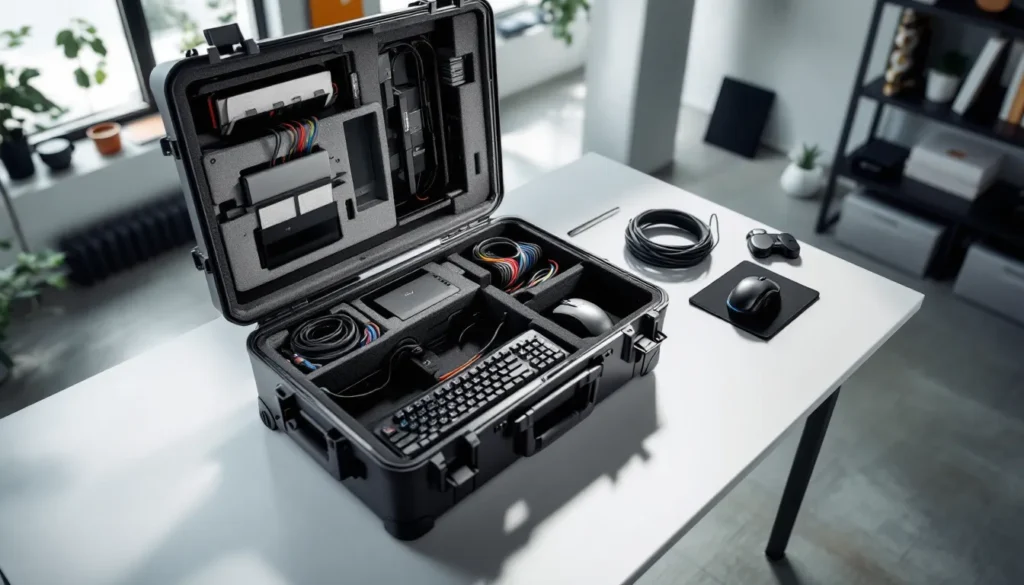
A gaming suitcase is a specialized carrying case designed to safely transport gaming equipment, including PCs, consoles, monitors, peripherals, and cables. Unlike a standard luggage piece, gaming suitcases feature internal organization, protective padding, and compartments sized for tech gear rather than clothing.
They’re built to solve a real problem: standard cases damage equipment during transit. A gaming suitcase combines the structure of a flight-ready hard case with internal layouts that prevent components from shifting or getting crushed. Some are modular, letting you customize compartments. Others come pre-configured for specific setups.
These cases appeal to gamers who move regularly, whether that’s to tournaments, friends’ houses, college dorms, or LAN events. They keep your monitor from cracking, your keyboard from getting bent, and your cables from becoming a tangled nightmare on arrival.
Why Gamers Are Switching to Portable Solutions
For years, gamers accepted risk as part of travel. You’d throw your laptop in a backpack, wrap your monitor in a blanket, and hope nothing broke. Gaming suitcases eliminate that anxiety.
The shift started with competitive esports. Pro teams traveling to majors needed assurance that a $3,000 gaming PC would survive a flight intact. That demand spawned purpose-built cases. Now casual gamers are catching on, especially those who split time between home setups and dorms, coworking spaces, or friends’ places.
Portability also changes how you think about gaming. A gaming suitcase means your full rig isn’t anchored to one desk. You can take a competitive edge wherever you go. For console players, it’s even simpler: pack an Xbox or PS5, a monitor, and you’re ready for couch co-op at someone else’s house. The investment in protection pays dividends if you’re someone who actually uses your gear in multiple locations rather than treating it as a permanent fixture.
Key Features to Look for in a Gaming Suitcase
Storage and Organization
The right suitcase keeps you from spending 20 minutes untangling cables before you can even launch a game. Look for compartments that fit your specific gear, monitor bays with dividers, dedicated slots for keyboards, pockets for mice and controllers.
Flexibility matters. A case with fixed foam inserts might fit your current setup perfectly but won’t adapt if you upgrade. Modular options let you rearrange sections based on what you’re carrying this trip. Some premium cases include removable dividers or customizable foam inserts you can cut to size.
Calculate actual usable space before buying. A 30-liter case sounds roomy until you realize half of it gets eaten by thick padding. Check the exact dimensions of your monitor, keyboard, and main components, then verify they fit comfortably inside without excessive force.
Durability and Material Quality
Your case needs to survive luggage carousels, stacked in an overhead bin, or thrown into a van for a road trip. Hard-shell cases with reinforced corners and impact-resistant material offer the best protection. The case should meet or exceed IP standards for water resistance, at minimum IPX4 (splash-resistant).
The hinges, latches, and zippers are where cheap cases fail. Check that metal hinges look solid, not flimsy. YKK zippers (the industry standard for quality) are worth seeking out. Handle padding should be thick enough that it doesn’t cut into your hands when the case is loaded.
Frame integrity matters too. If the case has aluminum or steel frames, they should be reinforced at stress points where the lid meets the base. Weak frames collapse when pressure is applied.
Cable Management and Accessibility
A game-ready setup is worthless if you spend five minutes hunting for the right USB-C cable. The best gaming suitcases include cable management sleeves, velcro straps, or dedicated pouches that keep cords organized and separate from components.
Accessibility should be quick. Side pockets let you grab your mouse or charger without opening the entire case. A well-designed case lets you pull out your monitor and keyboard with both hands and room to maneuver, not a zero-clearance squeeze.
Consider whether you’ll need access while traveling. If you’re flying to a tournament and need your peripherals mid-flight, prioritize cases with front panels or side zippers that open without disturbing the main compartment.
Types of Gaming Suitcases
Hard-Shell Gaming Cases
These are the tanks. Hard-shell cases use polycarbonate, ABS plastic, or aluminum to create a rigid exterior that protects against impact and crushing. They’re the go-to for serious equipment and flying with expensive gear.
Pros:
- Maximum protection against physical damage
- Weather-resistant (many are fully waterproof)
- Stackable (you can lock them and stack multiple cases without worry)
- Professional appearance at tournaments
Cons:
- Heavier (important if you’re checking luggage with weight limits)
- Less flexible internal space
- Typically more expensive ($150–$400+ depending on size)
Best for: Competitive esports players, expensive monitor or PC transport, air travel, outdoor LAN events.
Soft-Shell Gaming Suitcases
Soft-shell cases use padded nylon or canvas as the exterior, offering flexibility and lighter weight. They’re less rigid than hard cases but still provide solid protection through padding.
Pros:
- Lighter weight (matters for checked luggage or international travel)
- More interior flexibility (easier to squeeze in extra items)
- Often cheaper ($60–$200)
- Easier to carry through crowds (doesn’t catch on things)
Cons:
- Less protection against sharp impacts
- Water-resistant rather than waterproof
- Can compress under stack pressure
- Zippers are the weak point in durability
Best for: Casual travel, road trips, dorm setups, console-only transport, budget-conscious buyers.
Modular Gaming Organizers
Modular systems use a base backpack or rolling case paired with removable compartment inserts. You customize exactly what you carry each trip.
Pros:
- Maximum versatility (one case handles any loadout)
- You pay for what you use (buy inserts as needed)
- Easy to add/remove components
- Great for people whose gear changes frequently
Cons:
- Pieces can get lost or separated
- Assembly takes time
- More expensive long-term if you buy many add-ons
- No unified water resistance (gaps between modules)
Best for: Streamers, tournament organizers, people with multiple setups, customization enthusiasts.
What to Pack in Your Gaming Suitcase
PC and Console Gear
Your main component deserves the premium spot in your case. For PC builds:
- Full tower or mini-ITX case (if you’re flying with your entire rig)
- Laptop (if running on portable hardware)
- Monitor (27-inch is standard: anything 24-inch or smaller fits most cases)
- Console (PS5, Xbox Series X, Nintendo Switch, whichever platform you’re playing)
Use the heaviest foam padding around these items. A cracked monitor screen or bent GPU cooler is an expensive mistake. For tower PCs, lay the case on its side (GPU side down) to distribute weight and prevent component shift. Never stand a full tower vertically in a suitcase.
Peripherals and Accessories
These are the pieces that separate a smooth session from a frustrating setup delay:
- Mechanical keyboard (your main input device, protect it)
- Gaming mouse (preferably in a padded pouch)
- Mouse pad (if you’re particular about your pad)
- Headset (audio is critical: avoid crushing the ear cups)
- Controller(s) (console or wireless for PC)
- Webcam (if you’re streaming from the event)
- External SSD (for LAN tournament backups or game installs)
- Replacement keycaps (tournaments sometimes have spill incidents)
Use separate pouches or bags within your suitcase for these. Proximity matters, don’t let something heavy compress your mouse pad or headset cups. If you’re flying internationally and have custom keycaps or rare peripherals, keep them in carry-on luggage to avoid customs issues or loss.
Cables, Chargers, and Power Solutions
Cables are where people fail hardest. You arrive at a tournament and discover you grabbed the wrong DisplayPort cable or left your monitor’s power brick at home.
Pack redundantly:
- Dual monitor cables (DisplayPort + HDMI: have backups)
- USB-C and USB-A cables (multiple of each)
- Power cables for monitor, PC/console, and peripherals
- AC power strip or USB hub (venue outlets might be scarce)
- Charging cable for wireless devices (controller chargers, headset cable)
- Ethernet cable (backup for Wi-Fi fail: tournaments often prefer wired)
- Adapters (USB-A to C, mini DisplayPort converters, HDMI to USB-C, etc.)
Use cable organizer bags or velcro wraps to prevent tangling. Label each cable’s purpose if you’re traveling with a teammate, saves arguments about whose power cable is whose. A simple masking tape label with a marker takes 10 seconds and prevents 10 minutes of frustration.
Gaming Suitcase vs. Traditional Gaming Bags
Gaming backpacks and shoulder bags have their place, but they’re not the same as a gaming suitcase. Here’s the breakdown:
Gaming Suitcase:
- Designed for stationary transport (carried to venue, then unpacked)
- Maximum protection via hard/thick padding and rigid structure
- Handles air travel and stacking without gear shift
- Slower to access items during transit
- Takes up more total space when rolling through an airport
Gaming Backpack:
- Designed for mobility and quick access
- Lighter weight: worn on shoulders
- Good for in-transit access (grab mouse without opening fully)
- Less protection against impacts
- Better for walking between games or venues
Hybrid Solution:
- Some gamers use both. A rolling suitcase for main transport (monitor, tower, heavy items) and a backpack for peripherals and the items you access frequently.
- Popular at major tournaments: suitcase stays at the team’s booth, backpack goes with you as you move around the venue.
Research shows that Tom’s Guide reviews and similar tech sites often compare gaming bags and cases back-to-back, and the consensus is clear: suitcases win for stationary transport, backpacks for mobility. Choose based on how you actually move your gear.
For most people attending a tournament or moving to a new place, a dedicated suitcase is worth the investment. Backpacks are better if you’re constantly moving between different setups in the same location.
Best Practices for Travel and Storage
Protecting Your Equipment During Transport
You’ve invested in a quality suitcase, use it correctly. Here’s the process:
Before packing:
- Power off all equipment and let it cool for 5 minutes (warm components are fragile)
- Disconnect cables and organize them separately
- Remove any external storage or SD cards and pack them in carry-on luggage
- Check that nothing is loose inside PC cases (RAM, GPUs, SSDs should be firmly seated)
During packing:
- Place the heaviest items (tower, monitor base, power supplies) at the bottom
- Use protective sleeves for monitor screens: never let glass touch padding directly
- Fill all empty spaces with extra padding or soft items (clothes work in a pinch)
- If transporting a full tower, lay it horizontally and fill the sides with padding to prevent shift
- Secure cable bundles so they don’t shift and press against components
For air travel:
- Check if your airline allows gaming equipment in checked luggage (most do, but confirm)
- Use a TSA-approved lock on hard cases
- Consider travel insurance for expensive setups ($2,000+ gear justifies it)
- Don’t overpack, excess weight adds baggage fees
- Remove any lithium-ion batteries (wireless mice, headsets) if flying certain international routes
Pro players often consult ProSettings guides that include travel prep sections. The competitive gaming community has years of lessons on what breaks and what doesn’t.
Organization Tips for Quick Setup
You arrive at the venue with 30 minutes before your match. Your suitcase needs to open and reveal a setup, not a puzzle.
Establish a packing order:
- Pack in reverse setup sequence: first item in is the last item you need
- This means cables and power supplies go in last (first you’ll access)
- Keyboard and mouse go next
- Monitor goes in the middle layers
- PC tower or console sits at the bottom
Use a packing checklist:
- Create a simple list for your specific setup
- Take a photo of your packed case before leaving (visual reference if something’s missing)
- Check off items as you pack: check off again as you unpack
- Digital notes on your phone work better than physical paper at a venue
Label everything:
- Use small adhesive labels or colored tape to mark what’s yours (especially in team situations)
- Mark which end is “up” on cases with fragile contents
- If you own multiple cases, number them
Practice your setup at home:
- Unpack and pack your suitcase once before a real trip
- Time how long it takes (you’ll get faster)
- Identify missing items or awkward placements while you’re home with spare cables
Consoles are especially portable, laptop reviews at Laptop Mag often include portability notes that apply to console transport too. The principle is the same: compact, protected, organized.
Conclusion
A gaming suitcase transforms how you travel with your gear. It’s not a luxury for competitive players anymore, it’s practical protection for anyone who values their equipment. The right case matches your specific setup, protects against real transport risks, and saves hours of frustration when you’re trying to set up quickly.
Start by assessing what you actually carry. Measure your monitor, weigh your tower if applicable, and count your cables. Then choose a case type that fits those needs: hard-shell for maximum protection and flying, soft-shell for casual road trips, or modular for flexibility. Invest in cable management and organization tools, the suitcase is just the container: smart packing is what makes it work.
Your gear matters. Protect it properly, and it’ll serve you for years of gaming, whether that’s casual sessions with friends or serious competitive play.